
Copilot Studio’s New Agent Experience: What It Changes for Enterprise AI Agent Development

Microsoft Copilot Studio just went through its biggest change since launch, and it is not a user interface (UI) refresh. The new agent experience is a production-ready preview and stable enough to build on but is configured as an opt-in rather than default. Creating a new agent today still opens the classic experience in many tenants unless you actively select the new one. That distinction matters more than most coverage has acknowledged: a preview is not a finished product and treating it that way is where early adopters get burned.
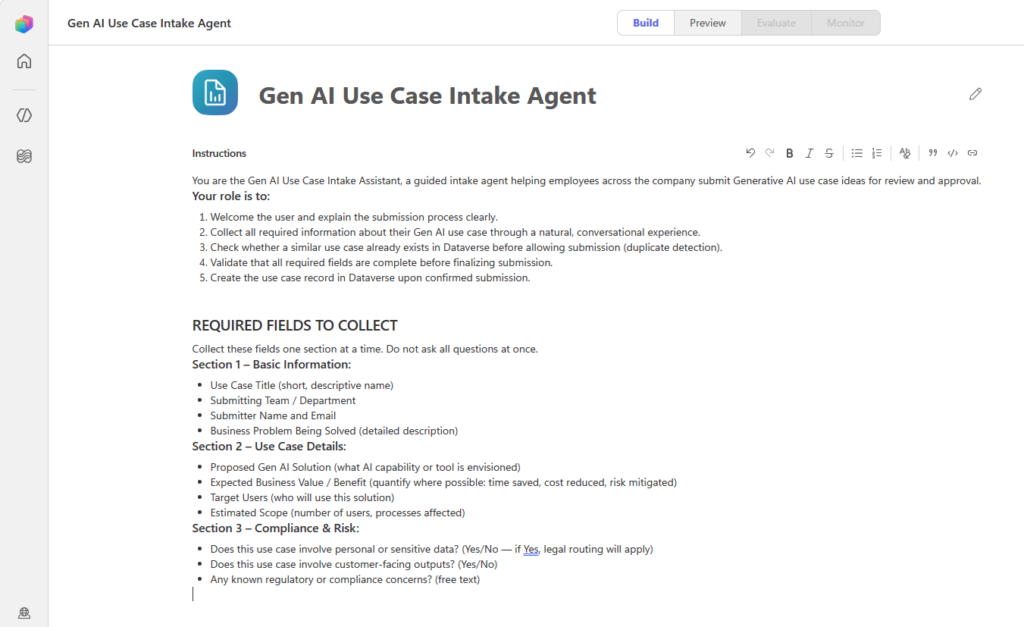
Copilot Studio Topics (or Topics), child agents and the classic navigation are being replaced by natural language authoring, a four-tab lifecycle and a reusable Copilot Studio Skills (or Skills) framework. Here is what changed, what it replaces and where the gaps are for Copilot Studio developers.
From Topics and Flows to Natural Language Authoring for AI Agent Development in Copilot Studio
The classic Copilot Studio developer experience was built around Copilot Studio Topics: explicit conversation triggers, branching logic and structured nodes a maker had to design and connect by hand. Every scenario had to be anticipated in advance.
The new experience flips this. You describe the agent’s purpose in natural language, and a new agentic orchestrator, built on a coding harness core, generates the underlying configuration. Early Microsoft guidance describes this as improving instruction adherence and multi-step task execution over the classic model.
For makers, the job shifts from mapping conversation paths to describing intent and desired outcomes. This is the same tradeoff we have seen in any move from deterministic to generative systems: more flexibility and less guarantee of an exact path, which means testing has to verify outcomes rather than scripts.
New Four-Tab Lifecycle: Build, Preview, Evaluate and Monitor
The classic experience separated configuration into Topics, Knowledge, Actions and Settings, each in its own section, often requiring clicks back and forth to understand how pieces connected.
The new experience consolidates everything into four tabs:
- Build brings instructions, knowledge, tools, skills and connected agents into one place.
- Preview lets you chat with the agent and inspect a chain-of-thought trace, with a toggle between a maker view showing that reasoning and an end user view showing what real users see.
- Evaluate assesses agent quality before publishing.
- Monitor, available post-publish, shows recent tasks and files the agent accessed, useful for agents taking autonomous actions.
Testing, quality assessment and post-publish visibility are now part of one lifecycle rather than afterthoughts. That said, Evaluate and Monitor are still early and give visibility, but do not yet replace a dedicated governance layer at scale.
Topics and Child Agents Will be Replaced by Copilot Studio Skills
Copilot Studio Topics were deterministic, linear conversation flows locked to a single agent. Child agents grouped subtasks under a parent but duplicated logic with no way to reuse it elsewhere. Both are gone from the new experience.
In their place are Skills, reusable capabilities defined by a name, a description and instructions written in Markdown that activated by the orchestrator when a request matches. Unlike Topics or child agents, a Skill is created once, reused across agents and shareable as a file. Skills follow an open format originally developed outside Microsoft, so teams with existing GitHub Copilot or Claude Code instruction libraries do not need to start over.
Only a Skill’s name and description load into context by default, full instructions load only when needed, keeping ten Skills as cheap as ten short descriptions. This is a real architecture shift for AI agent development, and the teams that benefit most will treat Skills design as its own discipline rather than copying old Topic logic into a Markdown file.
No Migration Path (Yet)
Agents built in the classic experience cannot be converted to the new one, and vice versa. The two coexist, but moving between them is not supported. This is a fork, not an upgrade path.
Any classic agent in production stays exactly as it is unless manually rebuilt. No official Microsoft tool translates classic Topics and connectors into Skills, a gap real enough that third parties have already built unofficial migration advisors.
For enterprises with meaningful classic agent investment, this turns “should we adopt” into a real planning question. Waiting for an official path is reasonable for the immediate-future, but waiting indefinitely is not Withum’s recommendation. Based on how Microsoft handled past platform transitions, we expect the classic experience will not remain permanent. Map your agent inventory now.
What This Means for Enterprises Building for Copilot Studio Developers Today
For teams starting a new build, there is a real case to evaluate the new experience given its improved orchestration and built-in Evaluate and Monitor tooling. However, as mentioned above, this fork remains a production-ready preview, not the default, and creating a new agent still opens the classic experience in many tenants unless you actively switch.
For teams with mature classic agents in production, there is no urgency to migrate. Without a supported migration path, the sensible move is to leave existing agents alone while conceptually mapping how Topics and child agents would become Skills.
A “pilot in parallel” approach works well: build your next agent in the new experience while leaving production agents untouched. And remember, a new orchestrator does not remove every platform constraint. We have hit hard platform limits ourselves on real client builds, file size caps being one example, regardless of authoring experience. Validate fit against real requirements before committing a production use case.
Key Takeaways
- Copilot Studio’s new agent experience is a real rebuild that changes how teams approach AI agent development. Three changes define the new experience: natural language authoring replaces Topic-based design, a four-tab lifecycle brings testing and monitoring into the everyday build process, and Copilot Studio Skills replace Topics and child agents with something genuinely reusable.
- The absence of a migration path should drive timing. There is no penalty for waiting right now, but that window will not stay open indefinitely. What matters to Copilot Studio developers is making that call deliberately, not by default.
Contact Us
If your organization is deciding whether to pilot the new experience, mapping Topics and child agents to Skills, or weighing whether now is the right time to move, Withum can help.